
Instructions: Read the Scenario below. Then answer the questions.
Scenario:
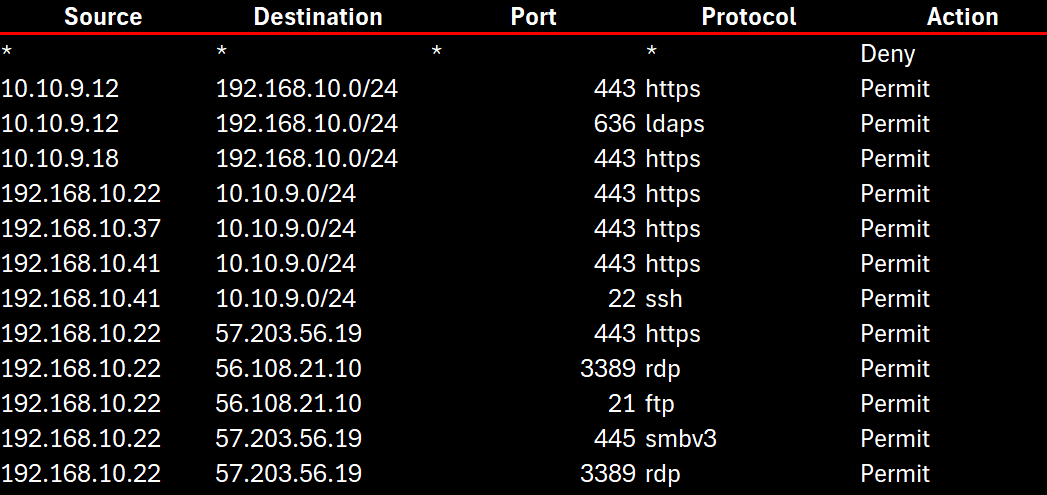
192.168.10.22 (Customer services workstation)
192.168.10.37 (Customer services workstation)
192.168.10.41 (Customer services workstation)
10.10.9.12 (Private engineering lab)
10.10.9.18 (Private engineering lab)
15-06-26 14:30 Info Scheduled malware scan initiated
15-06-26 14:30 Info Checking for updates
15-06-26 14:32 Info No updates available
15-06-26 14:32 Info Scan type = full
15-06-26 14:32 Info Scan start
15-06-26 14:32 Info Scanning system files
15-06-26 14:35 Info Scanning temporary files
15-06-26 14:35 Info Scanning Windows services
15-06-26 14:39 Info Scanning boot sector
15-06-26 14:39 Warn Scheduled scan disabled by process svch0st.exe
15-06-26 14:40 Warn Scheduled update disabled by process svch0st.exe
15-06-26 14:40 Info Files removed: 0
15-06-26 14:40 Info Files quarantined: 0
15-06-26 14:30 Info Scheduled malware scan initiated
15-06-26 14:30 Info Checking for updates
15-06-26 14:32 Info No update available
15-06-26 14:32 Info Scan type = full
15-06-26 14:32 Info Scan start
15-06-26 14:32 Info Scanning system files
15-06-26 14:35 Info Scanning temporary files
15-06-26 14:35 Info Scanning Windows services
15-06-26 14:39 Info Scanning boot sector
15-06-26 14:39 Warn File found svch0st.exe matches heuristic pattern (abnormal baseline)
15-06-26 14:40 Warn File quarantined svch0st.exe
15-06-26 14:40 Info Files removed: 0
15-06-26 14:40 Info Files quarantined: 1